The Journey Begins

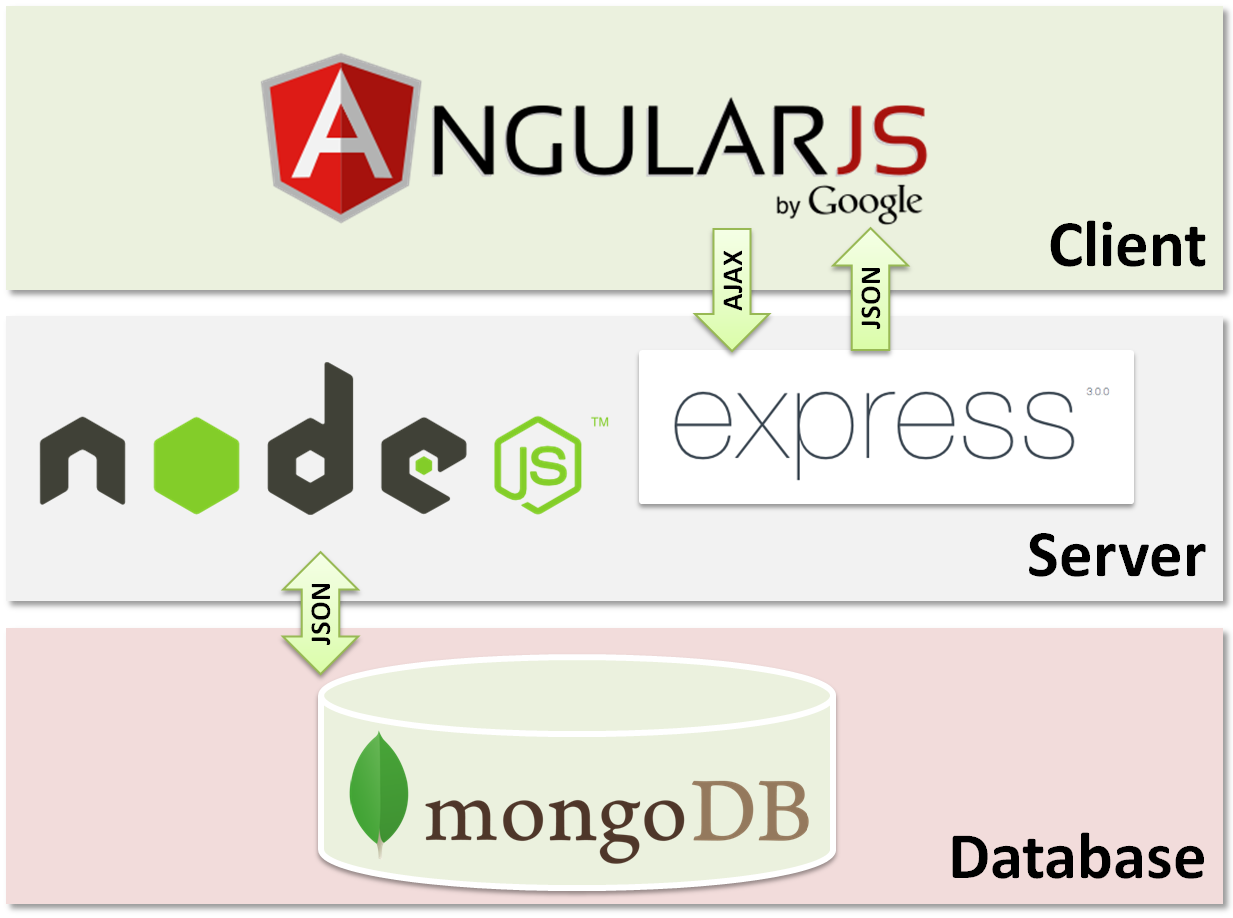
So after days of pondering and finding what to learn next, I zeroed upon JavaScript and the MEAN stack. For thos uninitiated, let me tell what MEAN stack is: It is a set of technologies that can be used to build web applications. Each part (MongoDB, ExpressJS, AngularJS, NodeJS) plays a specific role and has a specific place. Also as you may have guessed from the names, all are written entirely in JavaScript.
 

Now I have used JS previously in all my projects, extensively in CodeDiary and a PhoneGap app that built for someone I was working for, I still felt that I am not fully acquainted with even the basics of JavaScript and hence needed to learn more deeper. 

Also for a brief period I tried FreeCodeCamp (It's awesome) however I could not pursue it further as I felt the syllabus was too huge and was targeted towards total beginners in the game. Though I was fully convinced by Quincy Larsson's JS evangelism and decided that the MEAN stack will be my next gig.

JavaScript is no longer confined in the browser. It has moved ahead of all the criticism and hate thrown at it. Today, JavaScript is used in following ways:
  • Conventionally, in the browser, to add behaviour to pages
  • Outside the browser, as a stand alone engine to execute scripts on server side (NodeJS)
  • In IoT devices such as Raspberry Pi for interacting with hardware
  • The concepts stemmed from JS such as JSON are used in NoSQL databases 
So, it is very much possible to make a complete product entirely with JS right from the database tier to UI. This is what appealed to me (besides the colorful logos and slick websites of each component in the MEAN stack).

Last, a little mention about this very blog that you're reading. I read somewhere (most probably Quora) that maintaining a blog about what you are learning and keeping it updated is the best way to keep yourself motivated and document your learning at the same time. I'm a big fan of recording whatever I have learnt so that I can go back to it if the need be. Hence this blog.

I hope, someday (which I hope, is not too far), I will be reasonably proficient in the entire MEAN stack and develop slick products using it.

JavaScript 101: Variable Lifetime and Scoping


So as I said in my previous post, I decided to get re-introduced to JavaScript in a very in-depth way. Searched for a book on the internet. Found that Head First JavaScript is a good one which covers all the basic and some advanced topics and does so in a fun and engaging way. Decided to go with it.

Variable Scoping and Lifetime
This is probably the most read topics of all time whenever learning any language. Still, it is also the most ignored topic of all time. I did read the rules for scoping and lifetime for all the languages I learnt C, Java, but somehow the entire thing didn’t stick. I decided to once and for all “get” this and move on.
There are basically two types of scopes:
  1. Global: declared outside functions
  2. Local: declared in functions
That’s it. It’s that simple. Also, we should always use keyword var while declaring variables, else declarations (even those in functions) will be considered global! Major pitfall.

JavaScript does not have block level scope
Yes! Consider the following code in C/Java:
for (int i = 0 ; i < x ; i++) {}

Here, i is a variable which is declared locally to the loop. After the loop exits, there is no way you can retrieve the value of i.
However, consider the functionally same code in JS:
for (var i = 0 ; i < x ; i++) {}


In this code, the declared variable i is a global variable! Mind = blown!
This is because, as stated earlier, JS has only 2 types of scope: function (local) and global. So to solve the above mystery, you need to ask yourself: Is i in a function? No? Then it’s global.

Shadowing
If you declare a variable with the same name as a global variable in a function, the local variable always gets priority over the global one. The global one is thus inaccessible while you are inside the function. Same goes for parameter names, which are also local variables. Better avoid same names for local and global vars.

Hoisting
JavaScript fancy word #1. :-D Basically, hoisting means that all variables, no matter wherever they are declared or initialized, are always ‘hoisted’ (lifted) to the top of the script, except if they are in functions. Thus, you can do this:
foo = bar”;
var foo;

That means you can use a variable before it is even declared. Note: Only declarations are hoisted. Initializations/assignments are not. They execute on the line they were written originally.
It’s not the best practice to make extensive use of hoisting as it will eventually lead to confusing code.

JavaScript 101: Object Oriented JS


Reading the chapter related to OOP in Head First JS. Some basic rules:
Objects can be created as follows:

var myCar = {
 color: Red”,
 miles: 1321,
 model: Honda
};
It’s that simple.

Object properties can be accessed as follows:
myCar.color 
will yield “Red”.
No object can contain two or more properties with same names.


If you set a value of a property that doesn’t (yet) exist, it will be created. Like:
myCar.owner: Me”; 

will not throw an error, instead it will add the property owner to myCar variable.

Object properties can be deleted as follows:
delete myCar.miles; 
will simply drop the miles property from myCar object. delete returns a boolean value, which is true if it deleted the property or the property doesn’t exist, false if it encountered an error in deleting the property.

Objects don’t hold actual data, they hold references:
This is similar to Java. There are only a few primitive types: number, string, and boolean. A variable can contain this type of data directly. However, for objects and arrays, we have what is called as a reference type: it holds an address to the actual object. This is because we know beforehand the size of number, string and boolean variables. However the objects can contain 100’s of properties, so there’s no way to know their size beforehand. The object variables contain a reference to the actual object. However JS Engine abstracts the process of accessing the referenced object and makes it transparent to the user. Thus, normal and object variables can be accessed in a similar way.

Object are passed around as references:
Passing an object to a function isn’t same as passing a normal variable. JS is pass by value, or pass by copy, which means the variable will be copied and passed to the function. With objects, as we know that object variables hold references and not actual objects. Therefore, while passing to a function, the copy of the reference is passed, however the reference still points to the same object. Thus, a change made to the object in a function will change the original object.


var tito = {
  name: "Tito",
  age: 3
};
 
function growDog(dog) {
  dog.age++;
}
 
document.write(dog.name + " is " + tito.age + " years old.");
 
growDog(tito);
 
document.write(dog.name + " is " + tito.age + " years old.");

Will output: Tito is 3 years old.Tito is 4 years old.
 
This pointer is mandatory:
To access object properties from within the methods of the object, you must access it using a this pointer.
this is set to point to the current object when the method is called.

Ways of accessing a property:
Properties can be accessed in two ways:
object.propname 
Or
object[propname] 
These 2 forms are equivalent. The second form can accept any expression as long as it evaluates to a property name. Example:

object [“prop + name”] 
This cannot be done with the first method.

JavaScript 101: Data Types


The Head First JavaScript book says ..
…but to truly master the language, get that promotion, and get on to the things you really want to do in life, you have to rock at types.
I guess that’s what I really want to do .. So better study the chapter on Types seriously.

Null, Undefined, NaN:
This is a very confusing topic, even after so many years of programming I can’t wrap it up around my head! So in a nutshell -
Null is used to represent “no object”. That is, it is used in place where an object should be there but it isn’t. Like getElementById returns null when it does not find an object with that ID.
Undefined, on the other hand, is used to represent a variable that has not been initialized, an object with a missing property, or an array with a missing value.
NaN is a special value in JS that is used to represent a number that can’t be represented in computers. One example is (0/0). NaN != NaN, because the two numbers which can’t be represented may no necessarily be equal. IsNaN() is a special function used to check whether or not an expression evaluates to NaN.
Type of NaN is : number
Type of undefined is : undefined
Type of null is: object

Equality Checking and Type Conversion:
JavaScript has the == operator to check for equality. This operator works as follows:
  1. If the types of two operands are same, compare them.
  2. If the types of two operands are different, try to convert them to same types and then compare them.
It uses the following rules to convert operands:
  1. When comparing a string and number, convert the string to a number. If it cannot be converted, it is a NaN.
  2. When converting any value to boolean, convert both of them to numbers. (False = 0, True = 1) and compare.
  3. Comparing null and undefined always yields true.
Type Conversion for + operator:
If both operands are numbers, add. Else, if one is a string, concat them.

Type Conversion for other operators:
Try to convert both operands to numbers and then evaluate -, * or /.

The strict equality operator:
JavaScript uses the operator === to ensure strict comparison. This operator works just like == operator of any strictly typed language: if both operands ain’t of the same type, they ain’t equal.

Checking whether objects are equal:
Both == and === behave exactly same when comparing object references. They both compare references, which means the variables containing the addresses. So obj1 == obj2 returns true, if and only if obj1 and obj2 point to the same object.

Truthy and Falsy values:
These values are those which are not boolean but which are considered to be “true” or “false” by JavaScript, when comparing. There are 5 falsy values, rest all are truthy:
  1. null
  2. undefined
  3. “”
  4. 0
  5. NaN
A closer look at strings:
JavaScript has two types of strings: primitive and object strings. When we create a string, by default it is primitive. Such a string does not have any functions or properties. However, whenever we call a function on a string (such as substring) or access it’s properties, the primitive is converted to an object temporarily (which now has methods and properties) and then operation is performed on them.

JavaScript 101: Functions

There are two ways to use functions:

1. Using function declarations:
function print() {
      ...
 
2. Using function expressions:
var print = function() {
    ....
};

The JS parser does work in 2 passes. In 1st pass - it scans and stores all the functions. In 2nd pass, it actually executes the code. This enables us to write function declarations after the function calls in the code.

When the JS parser is in 1st pass, it comes across declaration #1 and creates a reference variable named "print", and stores the address of the function in it. It then moves forward and encounters #2. Since it is not a declaration but a expression, it ignores and moves forward, and starts the 2nd pass.

When the 2nd pass starts, actual code interpretation is carried out. During this, if it comes across a call to a previously declared function, it simply executes the function as it is previously known. However, as it hits #2, it processes the expression in following way:
  1. Create a function as per code
  2. Create a variable named "print" (as per code)
  3. Store the address of the function in the print variable
Basically, the work that is done in 1st pass automatically for declarations, is done in the second pass for #2 type function expressions.

How do they differ?
Time of execution: #1 type declarations are processed before run-time, all functions are available before even starting the interpretation of code. #2 type declarations are processed at run-time, meaning the interpreter creates function and reference on the fly. This also means that you have to create a function expression before calling it. This will not work:

foo(); //first call
var foo = function() {
} // then define

Naming: Both the functions use reference variables to store their address. The reference of #1 types are stored in a variable with the same name as the declaration, and this is automatically done by the interpreter. For #2 types, there is no automatic variable generation, simple a reference is returned. It is up to the programmer to decide what to do with it. It can be left as an anonymous function, or assigned to a variable manually.

Functions are First Class members in JavaScript
First class members in any language are those elements which can be - 
1. Assigned to a variable
2. Passed to a function
3. Returned from a function

All this can be achieved by passing around function references in JavaScript. A classic example is the Array.sort function: 

Array.sort([compareFunction])
compareFunction is a function which knows how to compare any 2 values in the array. The sorting algorithm implicitly calls this function for each sort compare.

JavaScript 101: Advanced Functions

Reading the chapter on advanced functions in Head First JS. JavaScript has some really powerful function capabilities - with the option to do pretty advanced stuff with functions.

Anonymous Functions
Have encountered them earlier in jQuery, while defining callbacks for network calls. When you declare a function, it is given a name by default. However when you use function expressions, you need not give the function a name. This is useful when you are writing a function which will not be called again in code, handlers, for example.

Nested Functions
JavaScript supports nested functions. That means you can declare a function in a function and use it as a local variable:
function quack(num) {
    var sound = "Quack";
    var quacker = function() {
       console.log(sound);
    };
    for (var i = 0; i < num; i++) {
        quacker();
    }
}

The rules for when you can refer to a function are the same within a function as they are at the top level. That is, within a function, if you define a nested function with a declaration, that nested function is defined everywhere within the body of the function. On the other hand,  if you create a nested function with a function expression, then that nested function is defined only after the function expression is evaluated.

Lexical Scope
Scope refers to the area in the program in which the variable is visible. The technique used to determine scope in JS is lexical scoping, meaning that you can tell the value or the scope of a variable by just looking at it's place in the program code, you don't need to wait for execution. Let's see an example:


var myVar = "hello!";    //global variable
function outer() {       //a function
    var myVar = "hi!";   //local variable which shadows global
    function inner() {   //inner function
        return myVar;    
       //it can refer to myVar as it is in enclosing function
    }
    return inner;       //returning reference to function
}

var innerFunc = outer();  //getting reference of inner function
var val = innerFunc();    //what will be returned?
//val now contains "hi!", not "hello!"


Mind = Blown!
If this was Java, or C, or any other language with dynamic scoping, here's how things would have happened: As the inner function is called from outside the outer function, and a variable named myVar exists in global scope, it would surely have returned that value.
But not so in JS! Lexical scoping follows the simple rule: To determine the value of a variable, we look at the nearest function scope. If it is not to be found there, it must be in global scope.
So here, take a look at definition of inner(). It is returning myVar. Which version? Apply our rule. Start from inside and move outside. The nearest myVar is in outer(). Hence, this is the one that will be returned. This is the basic idea of Lexical scoping, and in my opinion, is simpler than dynamic scoping.
 

JavaScript 101: Closures

OMG. Just reading the word 'Closures' makes me panic. I mean I have used a LOT of JavaScript in my projects, done callbacks 4 or 5 layers deep, basically all mind bending stuff. But never got my hands on closures. But it has always been in the back of my mind that one can never be true JS programmer without closures.

I did try to learn them, at many points in time, but failed miserably. All I could see was some weird syntax comprising of nested functions and parentheses. I SO wanted to master this!
Turns out, before closures, one must know what is Lexical Scope, which I do, now. So what is a closure? Answer: The function inner() from the earlier post! Yes, we have already implemented a closure without our knowledge.

Let me quote a formal definition of a closure from HFJS: "Closure, noun: A closure is a function together with a referencing environment."

A function will have local variables in it's body which are declared and initialized in the function. But a function may also have referenced variables which were declared outside the itself. They are called free variables of the function.They may be in an enclosing scope or global.When we have an environment that provides value for all the free variables, we say we closed the function. And when we take the function and the environment together, we have a closure.

So in the previous post, inner() was the function, and myVar, it's free variable, which was declared in outer(). We called inner() from outside the outer() function, however, surprisingly, it could still access myVar, which should have gone out of scope by now. But no, it is a part of the environment and hence was not killed. It was in the closure.

Why Closures?
The free variables (myVar in our case) are accessible only to the closure. It cannot be accessed by any other code. Hence closures can be used whenever there is a need to pack together a function and the data it uses, together privately. The data is persisted till the page is reloaded. 

A closure: function with it's environment, packed together.
 

Closures contain the actual environment, not a copy:
Many people (and I must admit, me included) think that closure will have a copy of the enclosing environment. This is not true. Closures reference the actual, live variables in the enclosing scope.

var closure = function () {
  var greeting = "Hi";
  setTimeout(function() {
    document.write(greeting);
  }, 1000)
  greeting = "Hello";
}

closure();


In this code, first we set the environment variable greeting to Hi! and then create a closure which is passed to setTimeout to be executed after 1 second. Then, we change the value of greeting. What is printed is the changed value, not the one that was there when the closure was created.


Ways to create closures
"Returning a function from a function isn’t the only way to create a closure. You create a closure whenever you have a reference to a function that has free variables, and that function is executed outside of the context in which it was created".

1. Passing a function to another function:
function closureCreator() {
  var local = 4;
  setTimeout(function() {
    alert(local);
  }, 1000);
}

closureCreator();


So in this code above, closureCreator() creates a function which has a free variable local and passes it to setTimeout. Thus, the inner function results in a closure being created.

2. Creating a closure using event handler:
Consider the following code:
window.onload = function() {
  var greeting = "Hello";
 
  var but = document.getElementById("but");
  var div = document.getElementById("message");
 
  but.onclick = function () {
    div.innerHTML = greeting;
  }
}

First, we define handler for window.onload. Then, in that handler we define some DOM references and a greeting variable.

Then, we create a handler for button click. In this handler, we access the DOM reference for div and greeting variable. This function will actually be called when button is clicked, which will be out of context. Thus, it will result in a closure.

Conclusion
I am starting to feel the heat! Whoever says that JavaScript is just a browser script used to do some client side validations, needs to look at this! This post will be updated as and when I get more clear about the idea of closures. I will end this post with a definition of closure in my words:

"Whenever a function containing free variables, is executed out of the score in which it was created, a closure is born. That closure contains the function as well as all the free variables referenced in the function."